There are times when you make me laugh
there are moments when you drive me mad
there are seconds when I see the light
though many times you made me cry
There's something you don't understand
I want to be your man
Chorus:
Nothing to lose
your love to win
hoping so bad that you'll let me in
I'm at your feet
waiting for you
I've got time and nothing to lose
There are times when I believe in you
these moments when I feel close to you
there are times I think that I am yours
though many times I feel unsure
There's something you don't understand
I want to be your man
Chorus:
Nothing to lose
your love to win
hoping so bad that you'll let me in
I'm at your feet
waiting for you
I've got time and nothing to lose
I'll always be around you
keep an eye on you
cos my patience is strong
and I won't let you run
cos you are the only one
Nothing to lose
your love to win
hoping so bad that you'll let me in
I'm at your feet
waiting for you
I've got time and nothing to lose
BY : TIARA P.B

TIARA PRISCILLA BOSTANI
Tuesday, February 3, 2015

LIRIK LAGU I LOVE THIS MUCH - MAGGIE MACNEAL
it's enough to be nedeed
it's enough to be you
through the holes in your head
the light is slowly coming thru'
oh that is taken
it's for love to show its best
and if i ever get it on with you
then you'll lead the way
it's enough to be with you
it's enough to be there
and the words that you sent
are getting through to me you'll get
oh what i do to come to terms
with what you've got
and if it means singing back you must
then in there it's lost
oh now and then i see myself
for what i really am
oh but if i keep discover up
then i've got it in the can
but if it means that i ain't
gonna see you anymore
they can shut up all the power
start to nail up all our doors
silver can be part of you
that i don't have to give
'cause other than the love of mine
i've nothing else to give
oh now and then i see myself
for what i really am
oh but if i keep discover up
then i've got it in the can
and if one night i'm left alone
with nothing else to do
i'll just sit at the piano
singing songs that speak for you
yes i might get lonely
and completely out of touch
but i'll sacrifice my friends
because i love you this much
i'll just sacrifice my friends
because i love you this much
BY : TIARA P.B
Thursday, January 29, 2015
CARA MEMBUAT ES KRIM POTOMG SINGAPORE
Salah satu es krim yang populer saat ini adalah es krim potong. Banyak yang bertanya-tanya sebenarnya bagaimana resep es krim potong itu? Sebenarnya sangat mudah. Hampir sama dengan resep es potong kebanyakan.
Dan es krim potong yang terkenal adalah es krim potong singapore. Jika anda penasaran dengan resep es krim singapore langsung saja simak baik-baik informasi yang satu ini.

BY : TIARA P.B
Dan es krim potong yang terkenal adalah es krim potong singapore. Jika anda penasaran dengan resep es krim singapore langsung saja simak baik-baik informasi yang satu ini.
Bahan Resep Es Krim Potong Singapore
- 150 gram krim bubuk
- 300 gram air es
- 250 gram stroberi yang didicuci bersih dan dicincang kasar
- 150 gram susu putih kental manis
- 1 sendok teh air jeruk lemon
- 4 tetes pewarna merah muda
- 40 gram wafer vanila yang dicincang kasar
Cara Membuat Es Krim Potong Singapore
- Pertama-tama kocok krim bubuk dan air es sampai mengembang
- Simpan kocokan tadi ke dalam lemari es
- Setelah itu aduk rata stroberi, susu kental manis putih, dan air jeruk lemon
- Selanjutnya Tuang ke kocokan krim dan aduk hingga rata
- Tambahkan pewarna merah muda dan aduk kembali hingga rata
- Tuang di loyang 22x22x4 cm yang dialas aluminium foil dan ratakan
- Taburi waver vanila di atasnya dan bekukan
BY : TIARA P.B
Tuesday, January 27, 2015
negara - negara yang merdeka setelah perang dunia 1

Gambar di atas adalah peta dunia.
negara - negara yang merdeka setelah perang dunia 1 adalah:

kelompok : tiara priscilla bostani
dwi fachraeini
puti evelyn
Wednesday, January 21, 2015
FUNGSI-FUNGSI TOOLBOX PADA CORELDRAW
Fungsi-Fungsi Toolbox pada CorelDraw
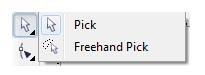
Pick tool = berfungsi untuk seleksi objek atau memilih objek
Freehand Pick tool = berfungsi untuk seleksi objek secara bebas
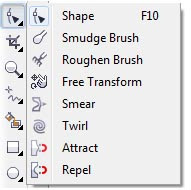
Shape tool = berfungsi untuk mengedit objek berbentuk kurva
Smudge Brush tool = berfungsi untuk merubah objek vektor
Roughen Brush tool = berfungsi untuk merubah garis luar objek vektor
Free Transform tool = berfungsi untuk merubah objek dengan menggunakan Free Rotation, Angle Rotation, Scale dan Skew Tool
Smear tool, Twirl tool, Attact tool, Repel tool
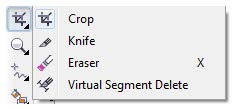
Crop tool = berfungsi untuk memotong atau menghapus objek
Knife tool = berfungsi untuk memotong objek
Eraser tool = berfungsi untuk menghapus objek
Virtual Segment Delete Tool = berfungsi untuk menghapus bagian dari objek diantara persimpangan
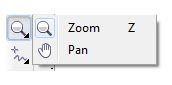
Zoom tool = berfungsi untuk memperbesar tampilan
Pan tool = berfungsi untuk menggeser tampilan layar
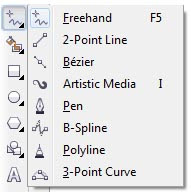
Freehand tool = berfungsi untuk membuat garis secara bebas
2-Point Line tool = berfungi untuk membuat garis tunggal tanpa kurva
Bezier tool = berfungsi untuk membuat kurva
Artistic media tool = untuk menyediakan akses pada Brush, Sprayer, Calligraphic, dan Pressure tool
Pen tool = berfungsi untuk membuat gambar kurva
Polyline tool = berfungsi untuk membuat garis dan kurva
3 Point Curve tool = berfungsi untuk membuat kurva dengan menentukan titik awal, akhir, dan titik tengah
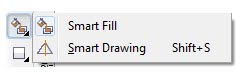
Smart Fill tool = berfungsi untuk mewarnai objek
Smart Drawing tool = berfungsi untuk merubah coretan tangan menjadi garis lebih halus
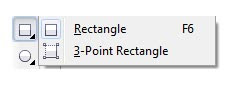
Rectangle tool = berfungsi untuk membuat gambar berbentuk kotak
3 point Rectangle tool = berfungsi untuk membuat kotak pada sudut tertentu
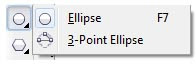
Ellipse tool = berfungsi untuk membuat lingkaran
3 point Ellipse tool = berfungsi untuk membuat lingkaran pada sudut tertentu
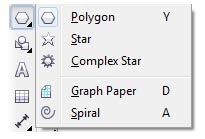
Polygon tool = berfungsi untuk membuat gambar berbentuk polygon
Star tool = berfungsi untuk membuat gambar berbentuk bintang
Complex Star tool = berfungsi untuk membuat gambar bintang banyak sisi
Graph Paper tool = berfungsi untuk menggambar sekat yang terdiri dari garis yang sama
Spiral tool = berfungsi untuk menggambar spiral
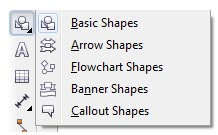
Basic Shape tool = berfungsi untuk memilih bermacam-macam bentuk
Arrow Shape tool = berfungsi untuk membuat gambar berbentuk panah
Flowchart Shapes tool = berfungsi untuk menggambar symbol flowchart
Banner Shapes tool = berfungsi untuk membuat gambar berbentuk pita
Callout Shapes tool = berfungsi untuk membuat callout
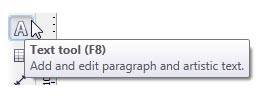
Text tool = berfungsi untuk membuat teks / tulisan
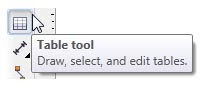
Table tool = berfungsi untuk membuat tabel
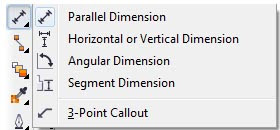
Parallel Dimension = berfungsi untuk membuat garis dengan ukuran dimensi miring
Horizontal or Vertical Dimension = berfungsi untuk membuat garis ukuran dimensi horizontal dan vertikal
Angular Dimension =berfungsi untuk membuat garis ukuran segitiga
Segment Dimension = berfungsi untuk menampilkan dimensi antara titik terakhir pada satu atau beberapa bagian
3-Point Callout = berfungsi untuk membuat garis petunjuk/keterangan
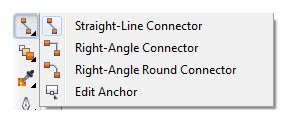
Straight-Line Connector = berfungsi untuk membuat konektor line / lurus
Right-Angle Connector = berfungsi untuk membuat konektor siku-siku dengan sudut tajam
Right-Angle Round Connector = berfungsi untuk membuat konektor siku-siku dengan sudut tumpul
Edit Anchor = berfungsi untuk mengedit garis konektor
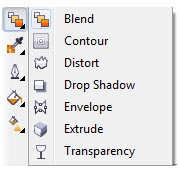
Interactive Blend tool = berfungsi untuk mencampur dua objek
Interactive Contour tool = berfungsi untuk membuat bentuk garis luar pada objek
Interactive Distortion tool = berfungsi untuk melakukan penyimpangan pada objek
Interactive Drop Shadow tool = berfungsi untuk memberi bayangan sehingga objek terlihat timbul
Interactive Envelope = berfungsi untuk melakukan penyimpangan pada objek dengan cara mendrag node
Interactive Extrude = berfungsi untuk membuat suatu ilusi kedalaman pada objek
Interactive Transparency tool = berfungsi untuk membuat objek menjadi transparan
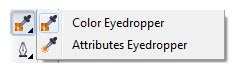
Color Eyedropper tool = berfungsi untuk memilih warna
Attributes Eyedropper tool = berfungsi untuk memilih dan menyalin properti pada objek
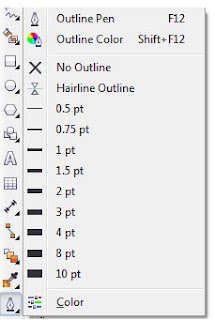
Outline tool = berfungsi untuk memberi garis dengan berbagai macam ketebalan garis
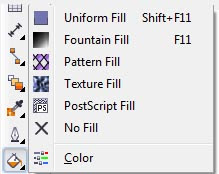
Fill tool = berfungsi untuk memberi warna seperti warna gradasi, pattern, bubble dan lain-lain
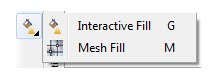
Interactive Fill tool = berfungsi untuk memberi warna dengan gradasi fill
Interactive Mesh tool = berfungsi untuk memberi warna gradasi fill dengan garis
BY : TIARA P.B

Pick tool = berfungsi untuk seleksi objek atau memilih objek
Freehand Pick tool = berfungsi untuk seleksi objek secara bebas

Shape tool = berfungsi untuk mengedit objek berbentuk kurva
Smudge Brush tool = berfungsi untuk merubah objek vektor
Roughen Brush tool = berfungsi untuk merubah garis luar objek vektor
Free Transform tool = berfungsi untuk merubah objek dengan menggunakan Free Rotation, Angle Rotation, Scale dan Skew Tool
Smear tool, Twirl tool, Attact tool, Repel tool

Crop tool = berfungsi untuk memotong atau menghapus objek
Knife tool = berfungsi untuk memotong objek
Eraser tool = berfungsi untuk menghapus objek
Virtual Segment Delete Tool = berfungsi untuk menghapus bagian dari objek diantara persimpangan

Zoom tool = berfungsi untuk memperbesar tampilan
Pan tool = berfungsi untuk menggeser tampilan layar

Freehand tool = berfungsi untuk membuat garis secara bebas
2-Point Line tool = berfungi untuk membuat garis tunggal tanpa kurva
Bezier tool = berfungsi untuk membuat kurva
Artistic media tool = untuk menyediakan akses pada Brush, Sprayer, Calligraphic, dan Pressure tool
Pen tool = berfungsi untuk membuat gambar kurva
Polyline tool = berfungsi untuk membuat garis dan kurva
3 Point Curve tool = berfungsi untuk membuat kurva dengan menentukan titik awal, akhir, dan titik tengah

Smart Fill tool = berfungsi untuk mewarnai objek
Smart Drawing tool = berfungsi untuk merubah coretan tangan menjadi garis lebih halus

Rectangle tool = berfungsi untuk membuat gambar berbentuk kotak
3 point Rectangle tool = berfungsi untuk membuat kotak pada sudut tertentu

Ellipse tool = berfungsi untuk membuat lingkaran
3 point Ellipse tool = berfungsi untuk membuat lingkaran pada sudut tertentu

Polygon tool = berfungsi untuk membuat gambar berbentuk polygon
Star tool = berfungsi untuk membuat gambar berbentuk bintang
Complex Star tool = berfungsi untuk membuat gambar bintang banyak sisi
Graph Paper tool = berfungsi untuk menggambar sekat yang terdiri dari garis yang sama
Spiral tool = berfungsi untuk menggambar spiral

Basic Shape tool = berfungsi untuk memilih bermacam-macam bentuk
Arrow Shape tool = berfungsi untuk membuat gambar berbentuk panah
Flowchart Shapes tool = berfungsi untuk menggambar symbol flowchart
Banner Shapes tool = berfungsi untuk membuat gambar berbentuk pita
Callout Shapes tool = berfungsi untuk membuat callout

Text tool = berfungsi untuk membuat teks / tulisan

Table tool = berfungsi untuk membuat tabel

Parallel Dimension = berfungsi untuk membuat garis dengan ukuran dimensi miring
Horizontal or Vertical Dimension = berfungsi untuk membuat garis ukuran dimensi horizontal dan vertikal
Angular Dimension =berfungsi untuk membuat garis ukuran segitiga
Segment Dimension = berfungsi untuk menampilkan dimensi antara titik terakhir pada satu atau beberapa bagian
3-Point Callout = berfungsi untuk membuat garis petunjuk/keterangan

Straight-Line Connector = berfungsi untuk membuat konektor line / lurus
Right-Angle Connector = berfungsi untuk membuat konektor siku-siku dengan sudut tajam
Right-Angle Round Connector = berfungsi untuk membuat konektor siku-siku dengan sudut tumpul
Edit Anchor = berfungsi untuk mengedit garis konektor

Interactive Blend tool = berfungsi untuk mencampur dua objek
Interactive Contour tool = berfungsi untuk membuat bentuk garis luar pada objek
Interactive Distortion tool = berfungsi untuk melakukan penyimpangan pada objek
Interactive Drop Shadow tool = berfungsi untuk memberi bayangan sehingga objek terlihat timbul
Interactive Envelope = berfungsi untuk melakukan penyimpangan pada objek dengan cara mendrag node
Interactive Extrude = berfungsi untuk membuat suatu ilusi kedalaman pada objek
Interactive Transparency tool = berfungsi untuk membuat objek menjadi transparan

Color Eyedropper tool = berfungsi untuk memilih warna
Attributes Eyedropper tool = berfungsi untuk memilih dan menyalin properti pada objek

Outline tool = berfungsi untuk memberi garis dengan berbagai macam ketebalan garis

Fill tool = berfungsi untuk memberi warna seperti warna gradasi, pattern, bubble dan lain-lain

Interactive Fill tool = berfungsi untuk memberi warna dengan gradasi fill
Interactive Mesh tool = berfungsi untuk memberi warna gradasi fill dengan garis
BY : TIARA P.B
Subscribe to:
Posts (Atom)